Workflow Automation
Automation Opportunity Calculator: Why Business Owners Should Measure Workflow Waste First
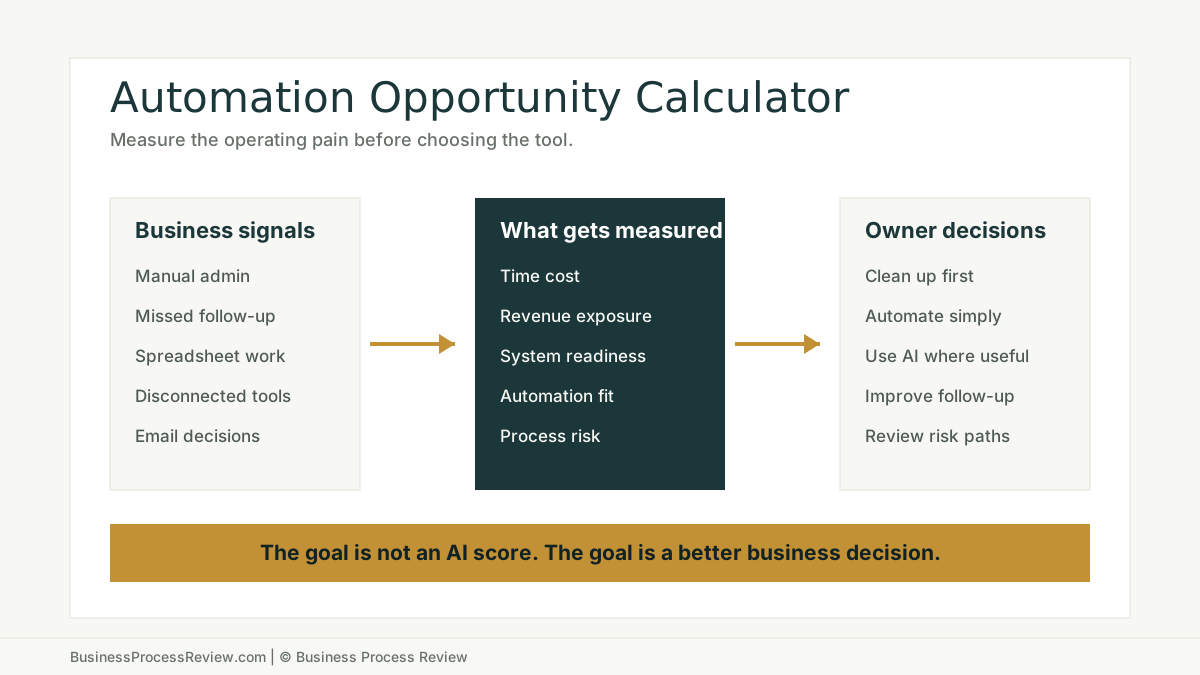
An automation opportunity calculator helps business owners see where manual work, missed follow-up, disconnected tools, and weak handoffs may be costing time and revenue before they buy more software.
Most business owners do not need another automation idea.
They need a better way to decide which work is actually worth fixing.
That is the real value of an automation opportunity calculator. It gives owners a structured way to look at the work that quietly drains time, leads, margin, and attention before they buy another tool or ask employees to do more with the same broken workflow.
The word “calculator” can make this sound more technical than it is.
The useful business question is simple:
Where is the company losing time or revenue because work still depends on memory, inboxes, spreadsheets, slow follow-up, duplicate entry, or unclear ownership?
That is where an Automation Opportunity Score can help. It gives the business owner a starting point. Not a guarantee. Not a software recommendation. Not an AI hype score.
A starting point.
The short answer
An automation opportunity calculator helps business owners decide whether a workflow deserves a closer look.
It is useful because most operating waste is scattered.
One person copies customer details into a spreadsheet. Another waits for a reply. A manager asks for status. A lead sits in an inbox. A quote needs follow-up. A customer asks the same question for the third time. Someone reviews a document manually because the system does not capture the fields cleanly.
None of those moments looks large alone.
Together, they become a business problem.
A good automation assessment helps the owner see:
- where repeated work is consuming labor
- where missed follow-up may be costing revenue
- where systems are not giving the team a clean source of truth
- where spreadsheets are hiding important operations
- where automation could help
- where AI may help because the work involves language, documents, summaries, or judgment
- where process cleanup should come before automation
That last point matters.
Automation is valuable only when it fixes the right problem.
Why business owners need a measurement step
Most owners can feel the friction before they can measure it.
They know the team is busy.
They know follow-up slips.
They know reports take too long.
They know too much work happens in spreadsheets.
They know someone is always chasing an update.
But vague friction is hard to prioritize. It competes with sales, hiring, customer issues, payroll, marketing, and daily fires. If the pain is not measured, it stays normal.
That is why an automation opportunity calculator is useful. It turns an operational complaint into a business question.
Is this workflow expensive enough to review?
Is the cost mostly admin time?
Is there possible revenue exposure from missed or slow follow-up?
Are the tools strong enough to support automation?
Does the workflow need AI, or would simple rules, reminders, routing, and better handoffs solve most of the issue?
Those are owner-level questions. They are not software questions yet.
The impact is not only labor cost
Repeated admin work has a real cost.
The U.S. Bureau of Labor Statistics reported that private industry employer compensation costs averaged $46.15 per hour worked in December 2025, with benefits accounting for 29.9 percent of employer costs.
That does not mean every business should use $46.15 as its own cost.
It means owners should not treat repeated office work as free just because it is spread across the week.
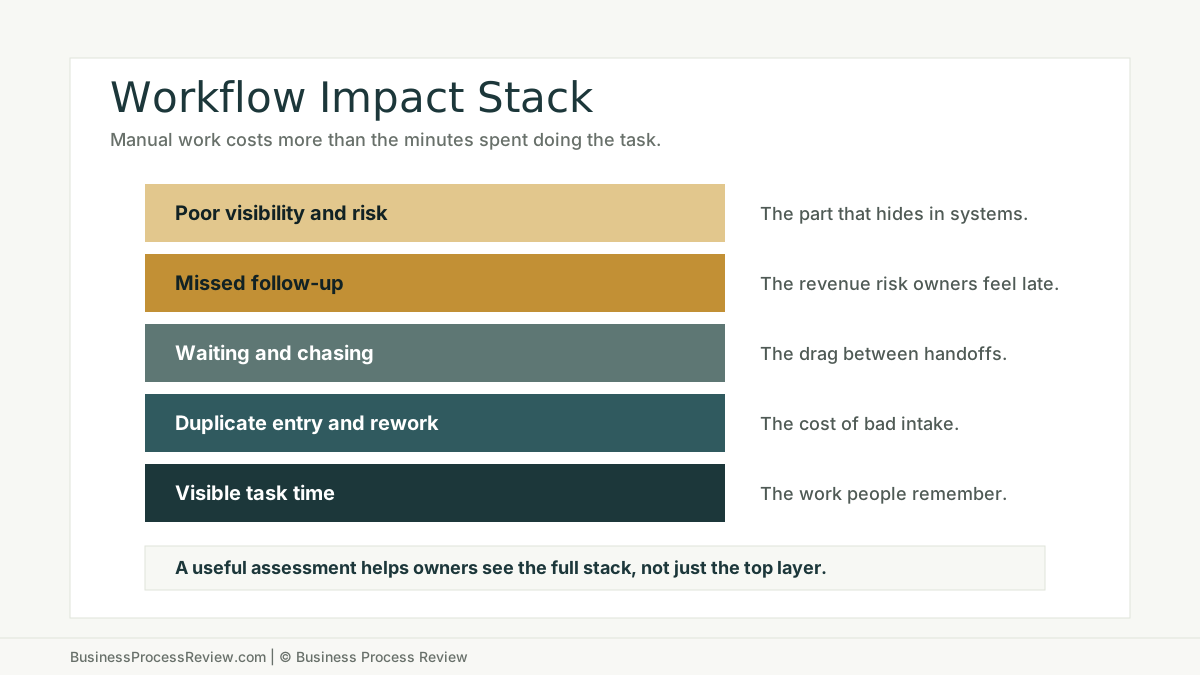
If a team loses 8 hours a week to manual updates, duplicate entry, status chasing, or report cleanup, that is not just an annoyance. It is a recurring operating cost. If a manager is part of that loop, the cost rises. If the work delays billing, scheduling, hiring, customer onboarding, or quote follow-up, the impact can spread beyond labor.
This is why the hidden cost of manual administrative work matters. The task time is only the easy part to count.
The surrounding drag includes:
- rework
- waiting time
- status checking
- manager follow-up
- delayed decisions
- poor visibility
- missed customer communication
- employees working from different versions of the truth
An automation opportunity calculator helps a business owner look at the full impact, not just the most visible task.
Missed follow-up is an operations problem
Many businesses think they have a lead-generation problem when they really have a follow-up problem.
The marketing is working.
The phone rings.
The form comes in.
The referral arrives.
Then the workflow fails.
Nobody sees the inquiry fast enough. The quote is sent but not followed up. A proposal sits waiting for the next touch. A customer asks a question and the answer depends on who remembers to reply.
Harvard Business Review’s article “The Short Life of Online Sales Leads” frames lead response as a time-sensitive business issue, not just a sales habit. The practical lesson for owners is direct: if follow-up depends on memory, inbox checking, or a busy employee finding time, revenue may leak before anyone notices.
This is one of the strongest reasons to use an automation assessment.
It can help owners see whether missed follow-up is a primary business issue or a secondary symptom of something else, such as weak tracking, no clear owner, or disconnected communication tools.
The answer matters because the fix changes.
If the problem is lead capture, fix intake.
If the problem is routing, fix assignment.
If the problem is follow-up, fix reminders and ownership.
If the problem is message quality, templates or AI-assisted drafts may help.
If the problem is that nobody trusts the CRM, the workflow needs cleanup before automation.
More software is not always the answer
Business owners are being pushed toward more software from every direction.
CRM tools. AI assistants. Scheduling apps. Workflow builders. Chatbots. Reporting dashboards. Automation platforms.
Some of those tools are useful. Some are exactly what the business needs.
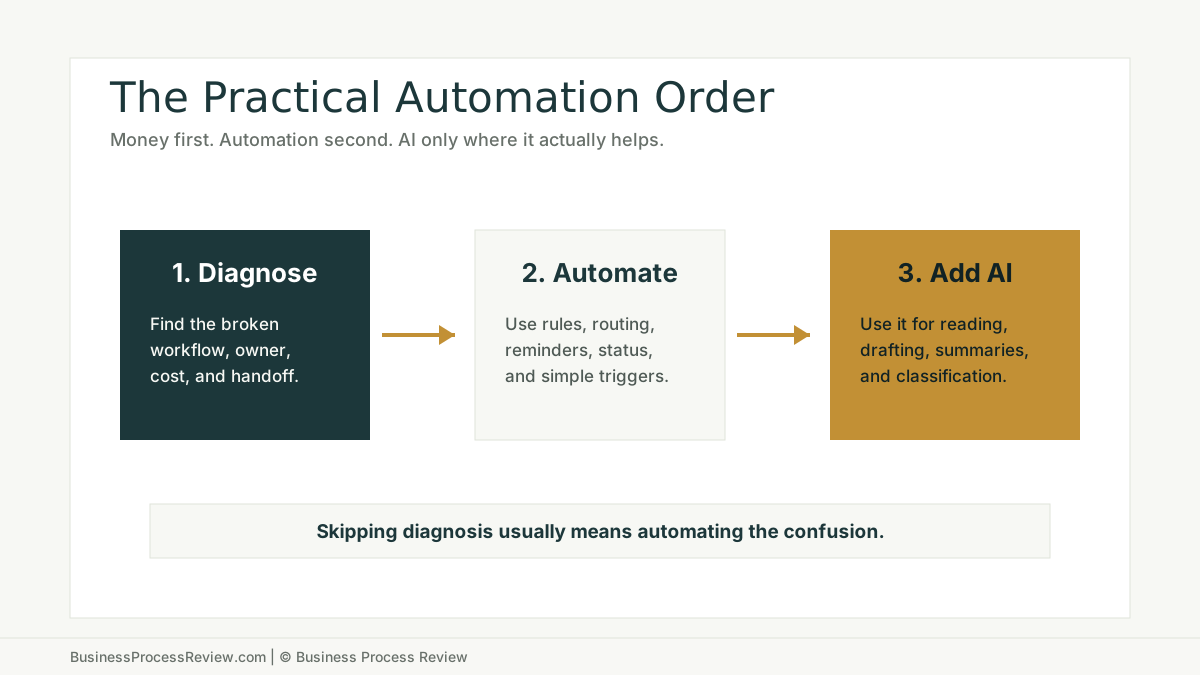
But a tool is not a diagnosis.
McKinsey’s 2025 State of AI research reported that 88 percent of respondents say their organizations regularly use AI in at least one business function, while most organizations are still in the experimenting or piloting stage at the enterprise level. McKinsey also lists workflow redesign as a key success factor for AI high performers.
That is the point for SMB owners.
The business value is not in saying “we use AI” or “we have automation.” The value is in changing how the work actually runs.
OECD data also shows that AI adoption by firms is expanding, with 20.2 percent of firms reporting AI use in 2025, up from 14.2 percent in 2024 and 8.7 percent in 2023. Tools are spreading quickly. That makes process judgment more important, not less.
An automation opportunity calculator gives the owner a calmer way to think.
Do not start with the tool.
Start with the workflow.
What the assessment should measure
A useful automation assessment should measure business pain in plain terms.
It should not ask whether the company is “innovative.”
It should ask whether important work is getting done reliably.
The most useful measurement areas are:
- manual time cost
- missed leads, requests, tasks, or follow-ups
- customer or job value
- number of people touching the process
- tools used to track leads, customers, jobs, invoices, messages, and email
- important work still happening in spreadsheets
- current use of automation tools
- whether the work is structured, repetitive, or language-heavy
- whether employees need to interpret emails, notes, forms, calls, documents, or customer questions
- whether phishing or suspicious email handling depends on employee judgment without a clear process
This is not about making every workflow look automatable.
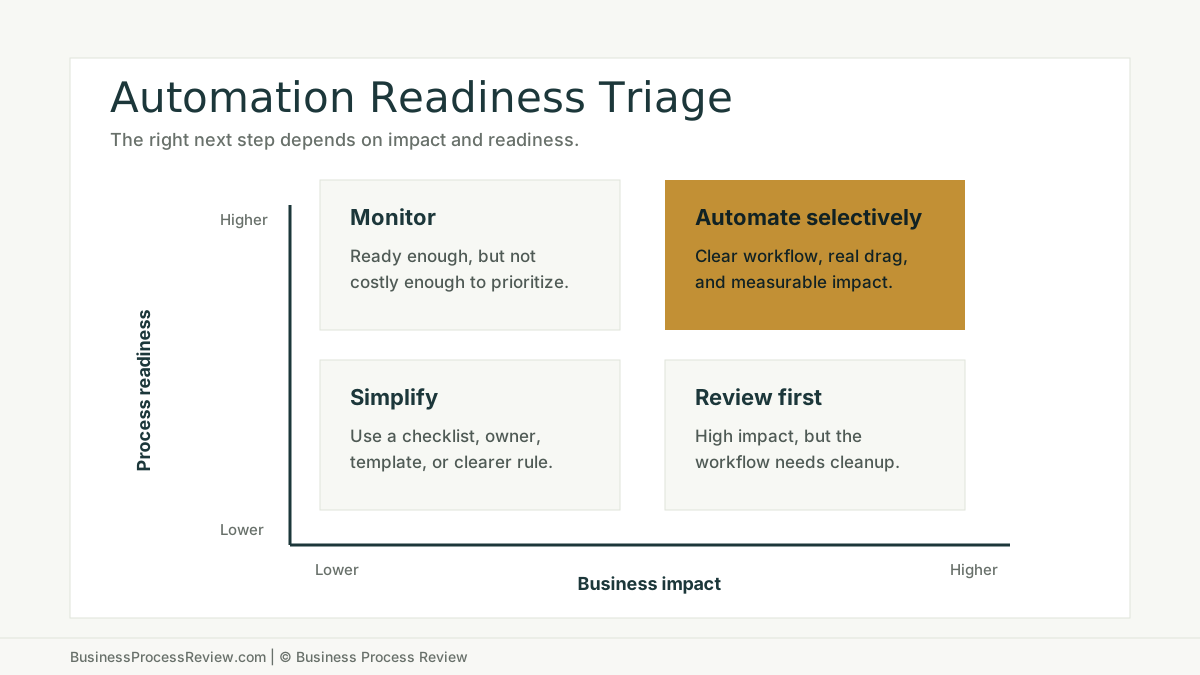
It is about knowing the difference between:
- process cleanup
- simple automation
- workflow redesign
- AI-assisted work
- employee training
- better tracking and reporting
- risk review
That distinction saves owners from wasting money on the wrong fix.
Where AI belongs in the decision
AI is useful when the work involves messy human communication.
That includes:
- reading and replying to repeated emails
- summarizing calls or notes
- reviewing documents
- classifying customer requests
- drafting first responses
- spotting unusual language or suspicious requests
- turning unstructured information into a cleaner handoff
AI is less useful when the work is predictable and structured.
If the workflow is mostly “when this happens, assign that person, create this task, update that status, and send this reminder,” then simple workflow automation may be better than AI.
This is not anti-AI.
It is pro-fit.
The best business owners do not ask, “How can we use AI here?”
They ask, “What is the work, what is the cost, what is the risk, and what is the smallest useful fix?”
That is why a calculator or assessment should keep automation at the center. AI can be part of the answer, but it should not be allowed to swallow the diagnosis.
Tech stack readiness matters
Automation works best when the business knows where work lives.
That usually means:
- leads have a clear tracking system
- customer records have a source of truth
- invoices and accounting handoffs are visible
- messages are not trapped on personal devices
- email and calendar are business-grade
- spreadsheets are not quietly running core operations
- employees know where to update status
- managers can see the workflow without asking five people
A company can have strong tools and still have weak workflows.
For example, the business may use a CRM, accounting software, phone system, and automation platform. But if important work still happens in side spreadsheets, the stack is not as ready as it looks.
The issue is not the spreadsheet itself. Spreadsheets are useful.
The issue is when spreadsheets become the hidden system of record for leads, jobs, invoices, scheduling, reporting, or forecasting.
That creates two problems.
First, automation has no stable truth to rely on.
Second, leaders lose visibility into the actual workflow.
This is why an automation assessment should measure both tools and behavior. The software list matters, but the workflow reality matters more.
Process risk belongs in the conversation
Business owners usually think about automation in terms of time and money.
That is right.
But process risk also matters.
If employees make decisions through email, they may face suspicious requests, fake invoices, impersonation attempts, password reset messages, or vendor payment changes. Verizon’s 2025 DBIR infographic says human involvement in cybersecurity breaches remained about 60 percent, and it names credential abuse and social actions like phishing as major factors in those breaches.
That does not mean every automation review should become a cybersecurity project.
It means suspicious-email handling is part of operational readiness.
The owner-level question is practical:
Do employees know what to do when a request looks wrong?
If the answer is unclear, the business may need better escalation rules, employee training, or a cleaner process for high-risk requests.
That risk should usually be secondary unless security is the main pain. But it should not be invisible.
How owners should use the result
The best use of an automation opportunity calculator is not to admire the score.
The best use is to pick the next workflow to review.
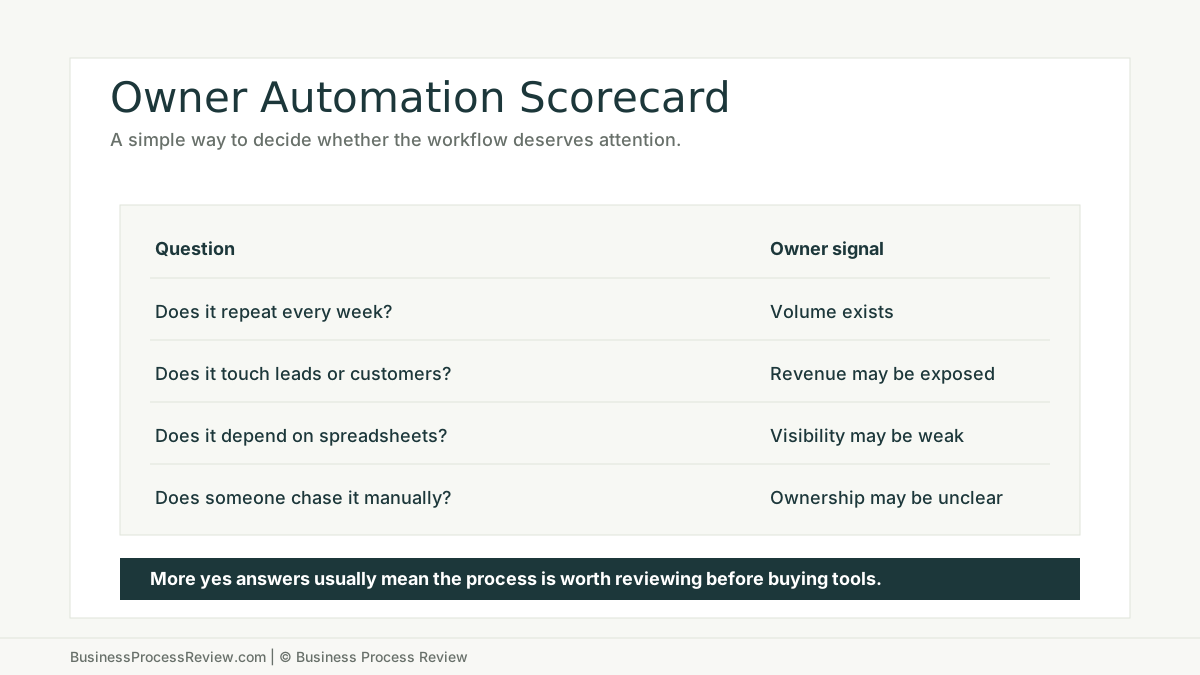
Start with the workflow that has:
- repeated weekly volume
- visible labor cost
- customer or revenue impact
- missed follow-up risk
- unclear ownership
- spreadsheet dependence
- multiple employees touching the process
- enough structure to improve
- enough risk to deserve care
Then ask what kind of fix the workflow needs.
If the process is unclear, document it.
If the handoff is clumsy, redesign it.
If the rules are clear, automate the routing, reminders, updates, and tasks.
If the work involves language, documents, summaries, or classification, consider AI assistance with human review.
If employees are using the tool differently, train the workflow.
If nobody owns the result after launch, do not automate yet.
When to get help
Use an automation opportunity calculator when the business knows work is inefficient but does not know what to fix first.
Then get help when the result points to a workflow with real impact.
Good candidates include:
- leads or quote follow-ups slipping through the cracks
- repeated admin work consuming several hours every week
- customer questions getting answered manually again and again
- managers chasing status instead of managing work
- documents, forms, or emails needing repeated review
- important reporting happening outside the main system
- spreadsheets acting as unofficial operations software
- employees handling suspicious requests without a clear escalation path
Those are not just annoyances.
They are signs that the business may need a business process review before buying more software.
A review can map the workflow, find the waste, clarify ownership, identify practical automation opportunities, and decide where AI automation implementation actually belongs.
The bottom line
An automation opportunity calculator is useful because it helps business owners slow down just enough to make a better decision.
Not every workflow needs AI.
Not every manual task deserves automation.
Not every software problem is really a software problem.
The value is in seeing where the business may be losing time, leads, money, and clarity, then deciding what kind of fix belongs there.
Use the Automation Opportunity Score to get a practical first read. If the workflow looks costly, repeated, and fixable, the next step is not another tool demo.
The next step is understanding the work well enough to improve it.

About the Author
Will Gordon
Will Gordon is the founder of Business Process Review and Chief Technology Officer at Billfy. He works on workflow systems, automation, and partnerships in the ServiceNow ecosystem, with a focus on practical operational improvements for growing businesses.
Connect with Will on LinkedInFAQ
Common Questions
What is an automation opportunity calculator?
An automation opportunity calculator is a business assessment that helps owners estimate where manual work, missed follow-up, weak systems, and repeated handoffs may be creating enough impact to justify process improvement or automation.
Why should a business owner use one?
A business owner should use one before buying more software because it helps separate real automation opportunities from problems caused by unclear ownership, weak intake, spreadsheet dependence, or poor follow-up.
Is automation always the right next step?
No. Some workflows should be documented, simplified, or redesigned before they are automated. The best first move depends on the business impact and how ready the workflow is.
What should an automation assessment measure?
It should measure manual time cost, missed follow-up risk, tech-stack readiness, spreadsheet dependence, automation fit, AI usefulness, workflow visibility, and process risk.
When should a business owner get help after using a calculator?
Get help when the assessment points to repeated manual work, unclear ownership, missed customer follow-up, spreadsheet-heavy operations, disconnected tools, or high-value workflows that are too messy to automate safely.