Back Office Operations
The Hidden Cost of Manual Administrative Work in SMBs
Manual administrative work costs more than task time. It creates rework, waiting, duplicate entry, manager follow-up, and delayed decisions.
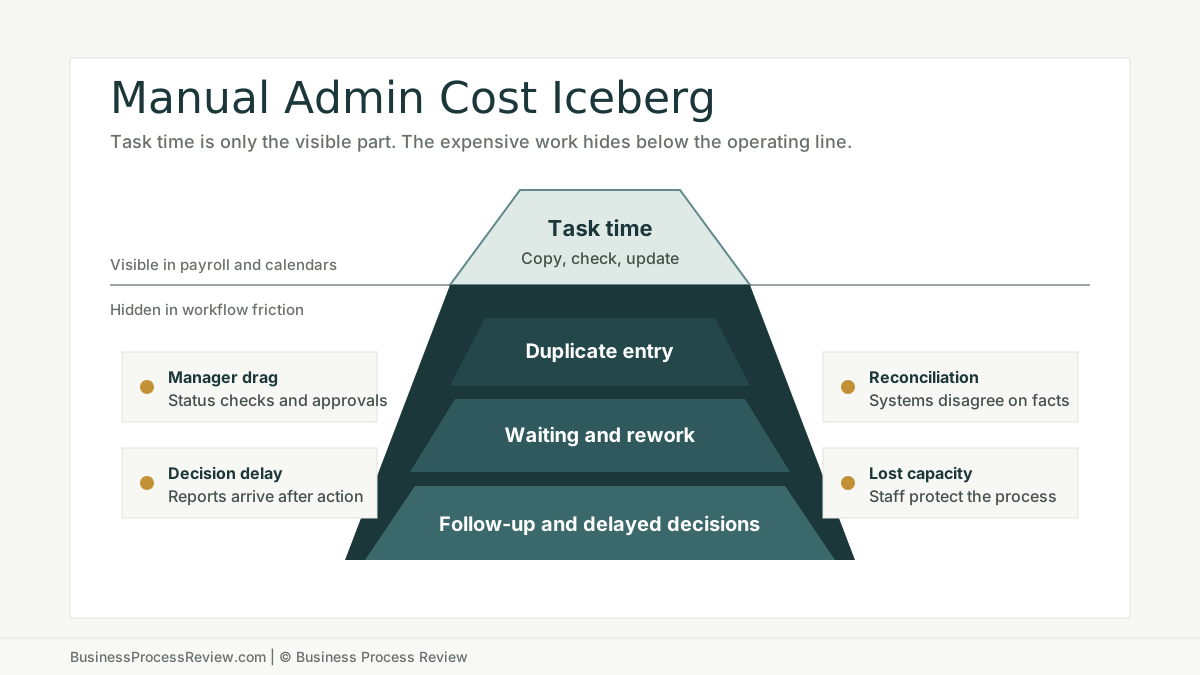
Manual administrative work looks cheap because it is scattered.
One person copies a field. Another checks an inbox. A manager asks for status. Someone fixes a typo. Someone else updates a spreadsheet because the system does not show what the team needs.
None of those steps looks serious alone.
Together they become an operating cost.
The short answer
The hidden cost of manual administrative work is not only the time spent doing the task.
It includes:
- repeated data entry
- waiting between handoffs
- rework from missing or inconsistent information
- status checking
- manager follow-up
- delayed invoicing, hiring, scheduling, or service delivery
- reporting built after the work already happened
- staff attention pulled away from higher-value work
This is why manual admin should be reviewed as a workflow problem, not only a staffing problem.
If the work repeats every week, touches customers, delays billing, slows recruiting, or eats management time, start with a business process review before buying another tool.
Start with loaded labor cost, not wage alone
The first mistake is calculating manual work with hourly wage only.
Use loaded labor cost. That means wages plus benefits and employer-paid costs. Your payroll data is the best source. BLS data is useful as a sanity check.
The U.S. Bureau of Labor Statistics reported that private industry employer compensation costs averaged $46.15 per hour worked in December 2025, with benefits accounting for 29.9 percent of employer costs. BLS also reported that the median annual wage for secretaries and administrative assistants was $47,460 in May 2024.
Do not treat those numbers as your company cost. Treat them as a warning: the real cost of repeated office work is higher than the wage line on a pay stub.
The visible cost is task time
Task time is the part everyone sees.
Examples:
- 8 minutes to enter a new customer record
- 12 minutes to prepare an invoice packet
- 15 minutes to update a candidate submittal
- 20 minutes to reconcile a delivery note
- 30 minutes to build a weekly report
That time matters, but it is rarely the full problem.
The larger cost usually sits around the task.
The hidden cost sits around the task
Manual administrative work becomes expensive when one task creates other tasks.
Duplicate entry
The team enters the same fact into a CRM, spreadsheet, accounting system, job tracker, email template, or shared drive.
The cost is not only typing. The cost is disagreement.
Once two places contain the same information, someone has to decide which one is current.
Waiting time
Manual workflows often spend more time waiting than working.
A request waits for a missing field. An invoice waits for approval. A candidate waits for a status update. A project handoff waits in an inbox.
Waiting time creates customer friction and internal uncertainty.
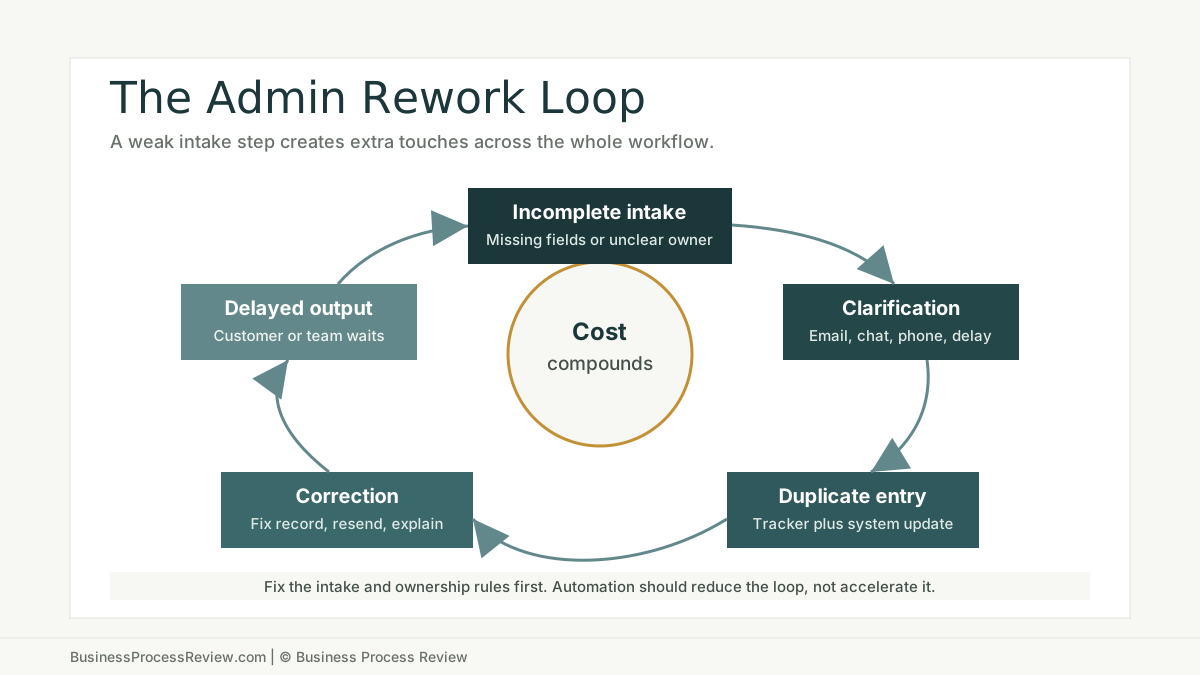
Rework
Rework is the tax on weak intake.
If the first step does not collect the right information, the workflow comes back later:
- “Who approved this?”
- “Which version is final?”
- “Is this the right customer record?”
- “Why does the spreadsheet not match the system?”
- “Who owns the exception?”
Manager follow-up
Managers often become the glue inside unclear workflows.
They ask for updates. They chase approvals. They resolve ownership confusion. They rebuild status from memory because the system does not show reality.
That time is expensive. It also trains the team to depend on interruption instead of process.
Decision delay
Manual reporting slows decisions.
If a weekly report requires exports, spreadsheet cleanup, manual formatting, and explanation, leaders are managing from stale information. They may still make the decision, but they make it later and with less confidence.
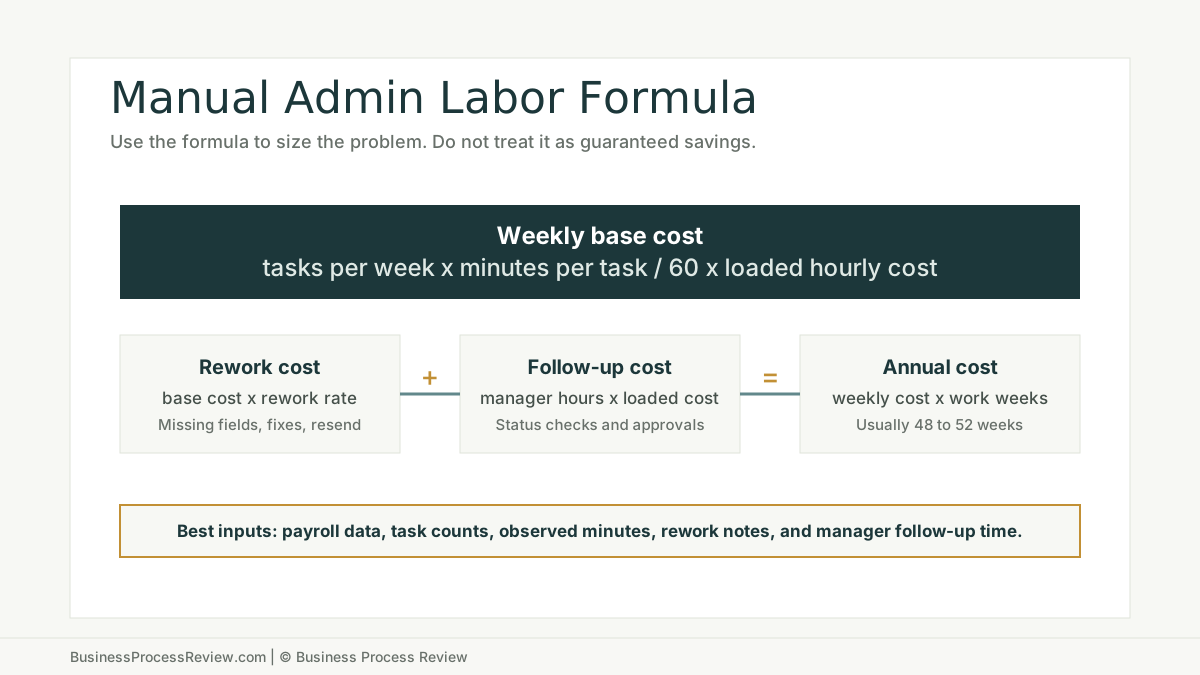
A simple cost example
Use a small scenario, not a fantasy benchmark.
Assume:
- 120 repeated admin tasks per week
- 9 minutes per task
- $42 loaded hourly labor cost
- 10 percent rework rate
- 2 hours per week of manager follow-up
The base task cost is:
120 x 9 / 60 x $42 = $756 per week
If rework adds 10 percent:
$756 x 10% = $75.60 per week
If manager follow-up costs 2 hours at $70 loaded hourly cost:
2 x $70 = $140 per week
The weekly cost is about $971.60.
Annualized across 50 working weeks, that is $48,580.
That number does not prove automation will save $48,580. It proves the workflow deserves a closer look.
Why SMBs miss the cost
SMBs usually miss manual admin cost for four reasons.
First, the work is split across people. Nobody owns the whole cost.
Second, the work is normal. The team has accepted the friction as “how we do it.”
Third, the work is not tracked. The payroll system shows labor, not workflow waste.
Fourth, the process is informal. If the real workflow lives in inboxes and employee memory, there is no clean place to measure it.
This matters because small and mid-sized companies often have less operational slack than larger firms. The OECD’s 2025 discussion paper on AI adoption by small and medium-sized enterprises notes that SME AI adoption remains relatively low compared with other digital technologies and larger firms. That gap is not only about access to tools. It is also about internal capability, process maturity, and implementation capacity.
Inventory the manual work before choosing the fix
Do not start with software.
Start with a manual work inventory.
For each repeated admin task, capture:
- task name
- department
- trigger
- volume per week
- minutes per task
- people involved
- system used
- source of truth
- rework frequency
- manager follow-up
- customer or delivery impact
- risk level
- automation fit
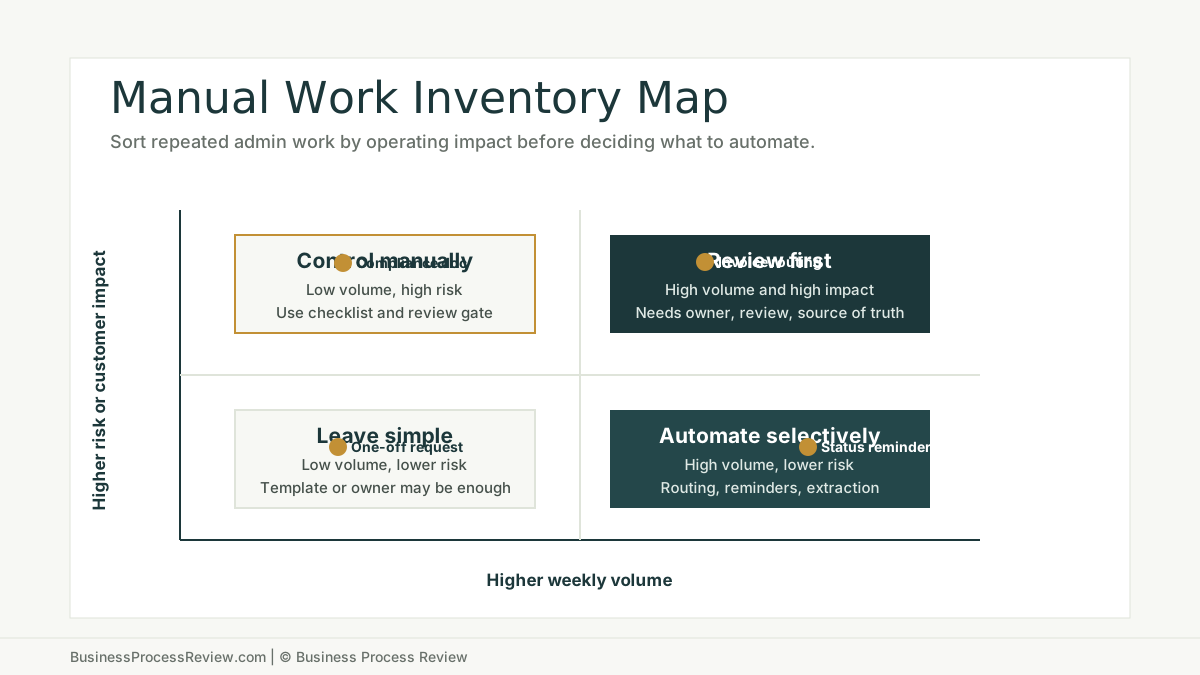
This inventory will usually show that the best first fix is not always automation.
Sometimes the fix is a required field. Sometimes it is a new owner. Sometimes it is removing a duplicate tracker. Sometimes it is a shared status view. Sometimes it is an AI-assisted workflow.
Where AI automation can help
AI can help when the workflow is clear enough to support it.
Good candidates include:
- extracting fields from documents
- summarizing structured notes
- classifying requests
- routing work to the right owner
- drafting status updates
- preparing first-pass reports
- checking completeness at intake
- flagging exceptions for review
Bad candidates include:
- workflows nobody can explain
- processes with no source of truth
- high-risk decisions with no review gate
- low-volume tasks that do not justify maintenance
- work where every case is truly different
Accenture’s research on AI-led processes found that companies with fully modernized, AI-led processes remain a minority of surveyed organizations. The useful lesson for SMBs is not “buy AI.” It is that process maturity, data, talent, and a roadmap matter before scale.
What to fix first
Fix the workflow in this order:
- Remove unnecessary duplicate entry.
- Standardize intake.
- Name the owner for each handoff.
- Define the source of truth.
- Add review gates where risk exists.
- Measure task time, rework, and follow-up.
- Automate the stable parts.
That order prevents the common mistake: automating the mess before anyone understands it.
When to bring in help
Bring in help when manual admin work is no longer just annoying.
Signs:
- managers spend too much time chasing status
- staff are doing the same entry in multiple tools
- customers wait because internal handoffs are slow
- reporting requires manual cleanup every week
- the business is considering automation but has not mapped the workflow
- nobody can say what the current process actually costs
Business Process Review can map the current state, quantify repeated manual work, identify quick fixes, and decide where AI automation implementation is worth building.
The point is not to eliminate every manual step.
The point is to stop paying people to hold a broken workflow together.

About the Author
Will Gordon
Will Gordon is the founder of Business Process Review and Chief Technology Officer at Billfy. He works on workflow systems, automation, and partnerships in the ServiceNow ecosystem, with a focus on practical operational improvements for growing businesses.
Connect with Will on LinkedInFAQ
Common Questions
What is the hidden cost of manual administrative work?
The hidden cost is the labor, delay, rework, status checking, manager follow-up, and decision drag caused by repeated administrative tasks that are not tracked as a separate operating cost.
How should a small business calculate manual admin cost?
Start with task volume, minutes per task, number of people involved, loaded hourly labor cost, rework rate, and manager follow-up time. Use the result as a directional estimate, not a guaranteed savings claim.
Should manual administrative work always be automated?
No. Some manual work should be documented, redesigned, delegated, or simplified before automation. Automation works best when the workflow has clear inputs, ownership, data, and review rules.
What manual admin tasks are often good automation candidates?
Document routing, intake checks, reminders, status updates, data extraction, report preparation, and repeated handoff notifications are often strong candidates when the process is stable.
When should a business get a process review for manual admin work?
Get a process review when repeated admin work is consuming staff time, creating rework, delaying customer work, hiding status, or requiring managers to constantly chase updates.