Workflow Automation
Workflow Automation vs AI Automation: What SMBs Should Fix First
Workflow automation, AI automation, and human-owned process change solve different problems. SMBs should diagnose the workflow before choosing the tool.
Workflow automation and AI automation are not the same thing.
That matters because small businesses often buy the wrong one.
They see an AI demo and try to use it for routing, approvals, status updates, and accountability.
Or they buy a workflow tool and expect it to understand messy emails, documents, and customer nuance.
Both choices create frustration.
The first question should not be “Which tool should we buy?”
The first question should be “What kind of work are we trying to fix?”
The short answer
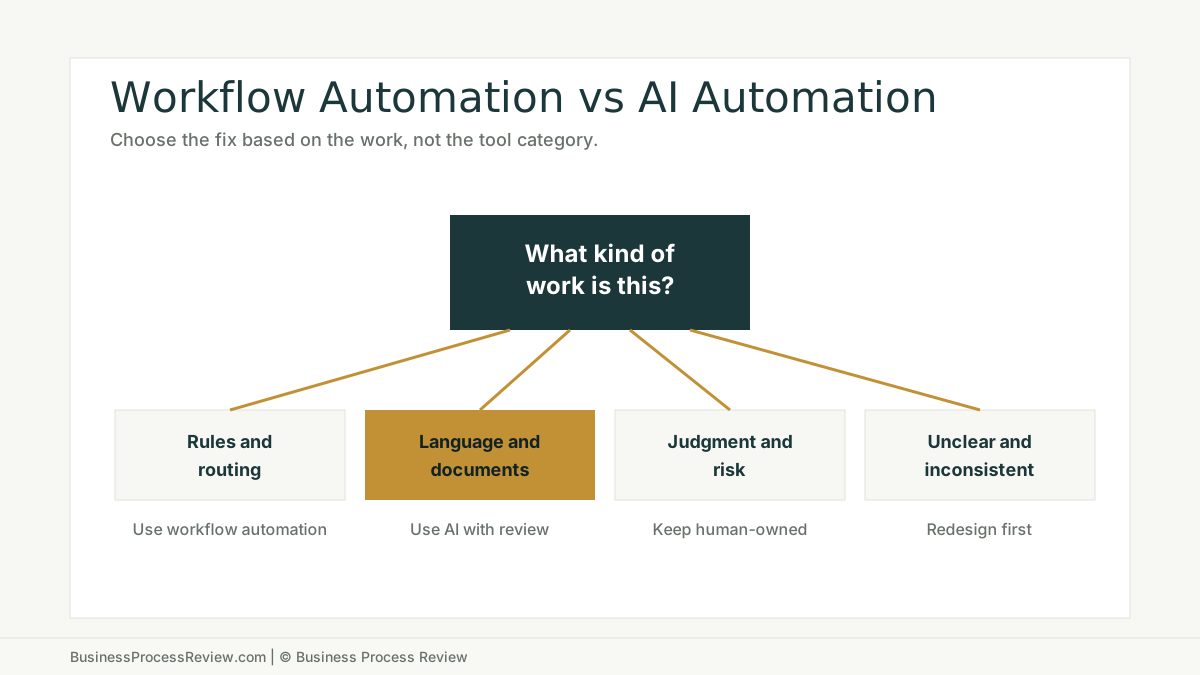
Use workflow automation when the work is structured, rules-based, and predictable.
Use AI automation when the work involves language, documents, summaries, classification, extraction, or first-pass drafting.
Keep humans in charge when the decision is risky, judgment-heavy, customer-sensitive, or poorly documented.
Redesign the workflow before automation when ownership, inputs, exceptions, or the source of truth are unclear.
Workflow automation moves work
Workflow automation is useful when the business knows what should happen next.
Examples:
- create a task when a form is submitted
- route a request by category
- send a reminder after two days
- require approval above a threshold
- update a project status
- notify the next owner
- move a record from one stage to another
This is rule-based work.
The logic can often be expressed as:
If this happens, do that.
If the request is missing a field, send it back.
If the amount is over the limit, route it for approval.
If the status changes, notify the next person.
Workflow automation is boring in the best way. It reduces dropped handoffs.
If the work can be modeled clearly, standards like BPMN can help teams describe the workflow before they choose a tool. The model does not need to be formal for every SMB, but the work does need to be clear.
AI automation interprets messy work
AI automation is useful when the work involves unstructured information.
Examples:
- summarize a customer message
- classify an inbound request
- extract fields from a PDF
- draft a response for review
- flag missing details
- compare two documents
- turn notes into a first-pass report
AI is not best used as a magic decision-maker.
It is often best used as an assistant inside a workflow with clear review rules.
McKinsey’s State of AI 2025 research reports that AI high performers are nearly three times as likely as others to fundamentally redesign individual workflows. That is the point. The value comes from changing how work runs, not sprinkling AI over the old process.
The wrong category creates the wrong failure
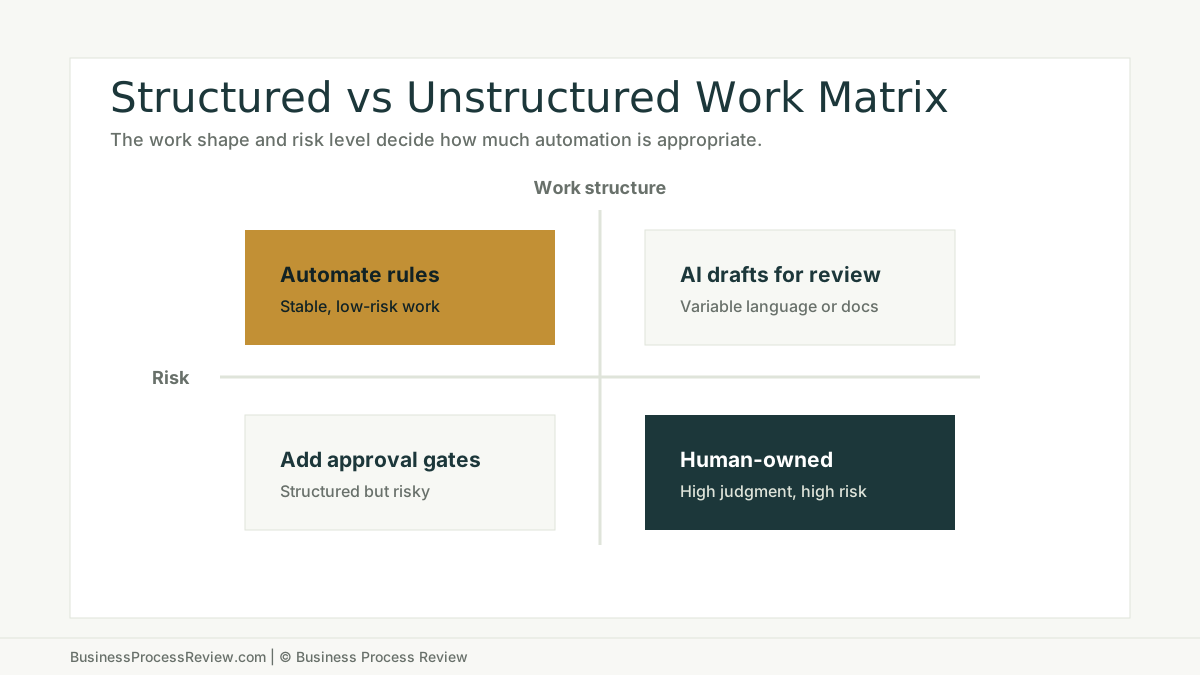
When a company uses AI where rules would work better, the workflow becomes less predictable.
The team gets variable outputs for a problem that needed stable routing.
When a company uses rules where AI assistance would help, the workflow becomes brittle.
The system cannot handle variation in language, documents, or customer context.
When a company automates a decision that should stay human-owned, the business creates risk.
The work may move faster, but the judgment gets worse.
NIST’s AI Risk Management Framework exists because AI systems require risk management, not blind trust. For SMBs, this means practical review gates, accountable owners, and clear escalation paths.
Use this triage before buying tools
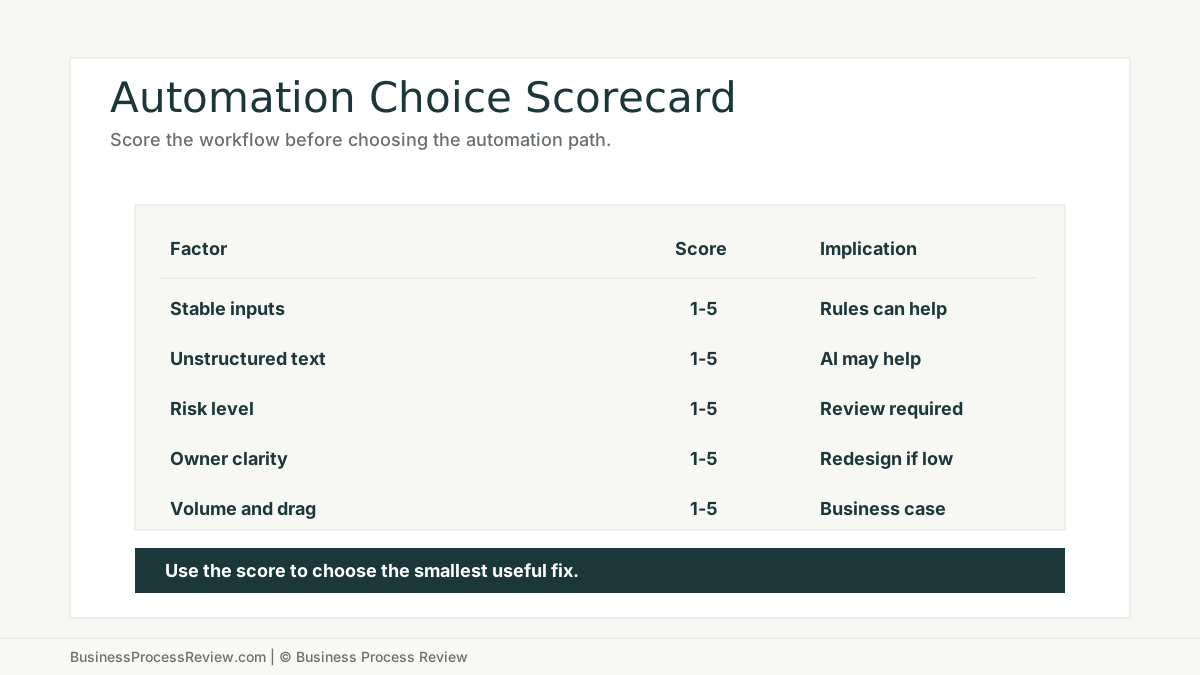
Ask these questions for each workflow step:
- Is the input stable?
- Is the decision rule clear?
- Does the step involve messy language or documents?
- What happens if the output is wrong?
- Does a human need to approve it?
- Who owns the step after launch?
- How will we measure whether it improved?
Examples of the right split
Invoice approval
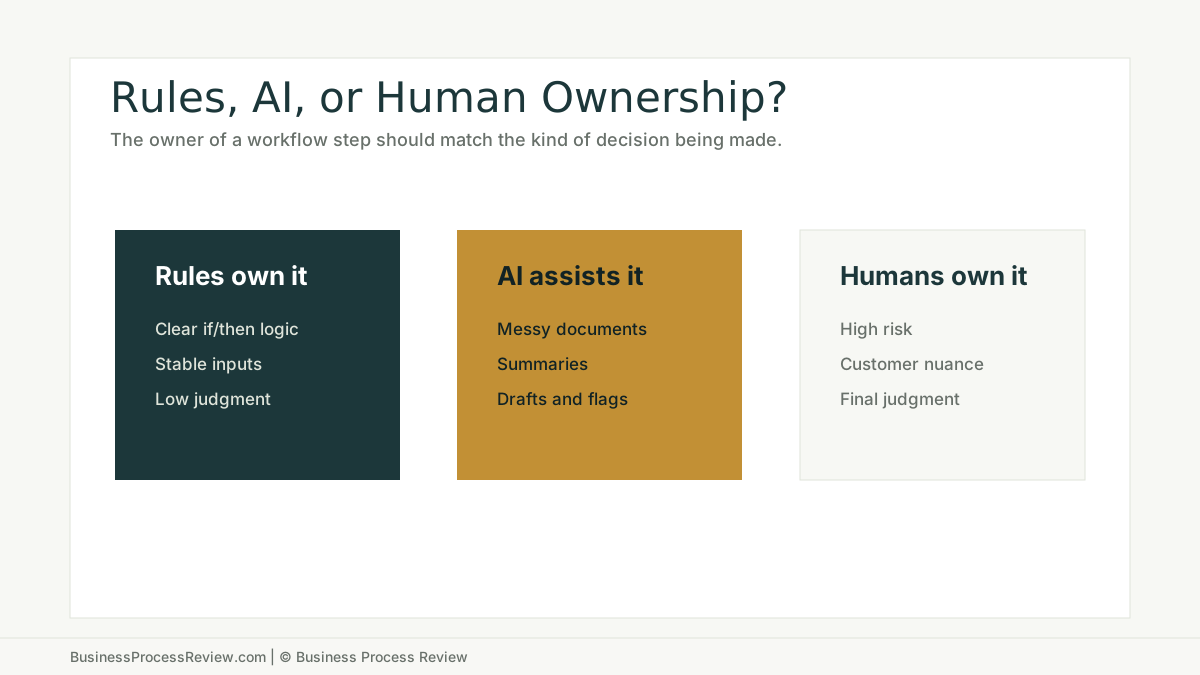
Workflow automation should route the invoice, assign the approval, track status, and notify the next owner.
AI may extract invoice fields, flag mismatches, and summarize exceptions.
A human should approve payment and resolve disputed items.
Candidate intake
Workflow automation should create the record, assign the recruiter, and move the candidate through stages.
AI may summarize notes, classify skills, and draft outreach.
A human should decide fit and manage communication.
Customer onboarding
Workflow automation should create tasks, deadlines, reminders, and status changes.
AI may summarize kickoff notes, check missing information, and draft onboarding updates.
A human should handle exceptions and customer-sensitive decisions.
Do not automate around broken ownership
McKinsey’s article on how COOs maximize operational impact from gen AI and agentic AI emphasizes operating structure, data governance, and change management. That is enterprise language, but the SMB version is direct:
Name the owner.
Clean the source of truth.
Train the people.
Measure the result.
If those are missing, neither workflow automation nor AI automation will hold.
The bottom line
Workflow automation moves predictable work.
AI automation helps interpret variable work.
Humans should own risky judgment.
Workflow redesign should come first when the process itself is unclear.
If your team is debating tools before it has mapped the workflow, start with a Business Process Review. The right automation category should be the result of diagnosis, not the starting assumption.

About the Author
Will Gordon
Will Gordon is the founder of Business Process Review and Chief Technology Officer at Billfy. He works on workflow systems, automation, and partnerships in the ServiceNow ecosystem, with a focus on practical operational improvements for growing businesses.
Connect with Will on LinkedInFAQ
Common Questions
What is the difference between workflow automation and AI automation?
Workflow automation moves work through rules, routing, reminders, approvals, and system updates. AI automation helps with variable language, documents, summaries, classification, drafting, and exception detection.
Should an SMB start with workflow automation or AI automation?
Start with workflow diagnosis. If the work is structured and rules-based, use workflow automation. If the work involves messy text or documents, AI may help, but usually with human review.
When should a process stay human-owned?
Keep a process human-owned when the decision is high risk, context-heavy, customer-sensitive, legally sensitive, or dependent on judgment that has not been documented.
Can workflow automation and AI automation work together?
Yes. A workflow system can trigger, route, assign, and track work while AI drafts, classifies, summarizes, or flags exceptions inside the workflow.
What should be fixed before automation?
Fix unclear ownership, unreliable inputs, conflicting data, missing review gates, undocumented exceptions, and weak success metrics before automating.