Workflow Mapping
How to Tell If a Business Process Should Be Automated
A practical decision model for deciding whether a business process should be automated, redesigned, documented, or left with human judgment.
A process should be automated only when the work is clear enough to automate.
That sounds obvious. It is not how many companies make the decision.
Most teams decide to automate because a task is annoying, slow, or repetitive. Those are signals, but they are not enough. A slow process may need automation. It may also need clearer ownership, better data, fewer approvals, a real source of truth, or basic documentation.
The first question is not “Can we automate this?”
The first question is “What is actually broken?”
The practical automation test
A process is a good automation candidate when it has most of these traits:
- repeated volume
- stable inputs
- clear start and end points
- named owner
- repeatable decision rules
- reliable source data
- clear exception path
- defined human review point
- measurable outcome
- enough labor cost to justify the build and maintenance
If several of those are missing, start with a business process review or workflow redesign before implementation.
Do not automate the pain. Diagnose it.
Pain is not a process diagnosis.
Operators often say:
- “This takes too long.”
- “We keep chasing people.”
- “The team enters the same data twice.”
- “Nobody knows where the request is.”
- “We need AI to handle this.”
Those statements are useful, but they are symptoms. The diagnosis might be different:
- intake is incomplete
- the wrong role owns the next step
- data lives in two systems
- the process has too many approvals
- exceptions have no owner
- the team does not trust the system
- reporting is built after the fact
Appian’s guidance on when to automate a process points to signs such as long completion times, long waits between steps, frequent rework, and variable completion times. Those are good warning signs. The next step is to find the root cause before choosing the fix.
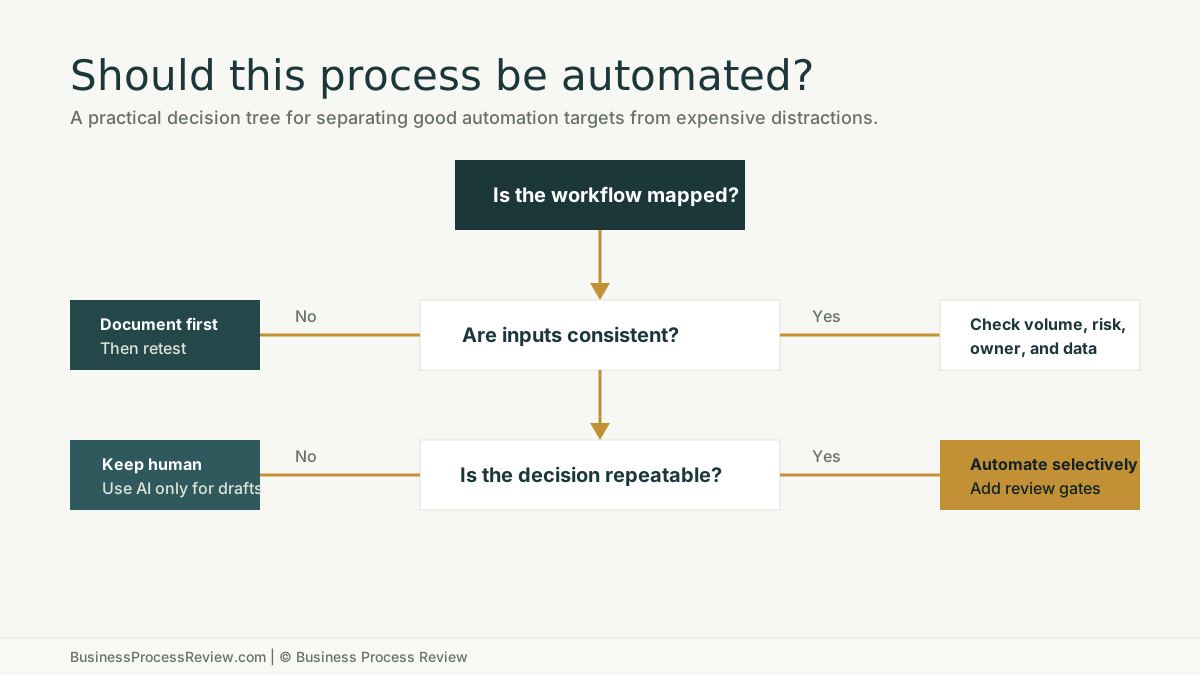
Use this decision tree
Automation should come after the workflow passes a few simple tests.
Is the workflow mapped?
If the process is not mapped, document it first.
You need to know:
- what starts the process
- what information is required
- who owns each step
- where the work moves
- what systems are involved
- what happens when something is missing
- what the output should be
Automation without a map creates hidden architecture. It may work for a few weeks. Then an exception appears, a tool changes, or the person who understood the workaround leaves.
Are the inputs consistent?
AI and automation both struggle when the input changes shape every time.
Examples:
- job requests arrive with missing fields
- customer emails use no standard format
- invoices are routed without vendor categories
- resumes are stored in multiple places
- project handoffs depend on long notes
If inputs are inconsistent, the first fix may be a better form, intake rule, or source-of-truth structure.
Is the decision repeatable?
Some decisions repeat. Some do not.
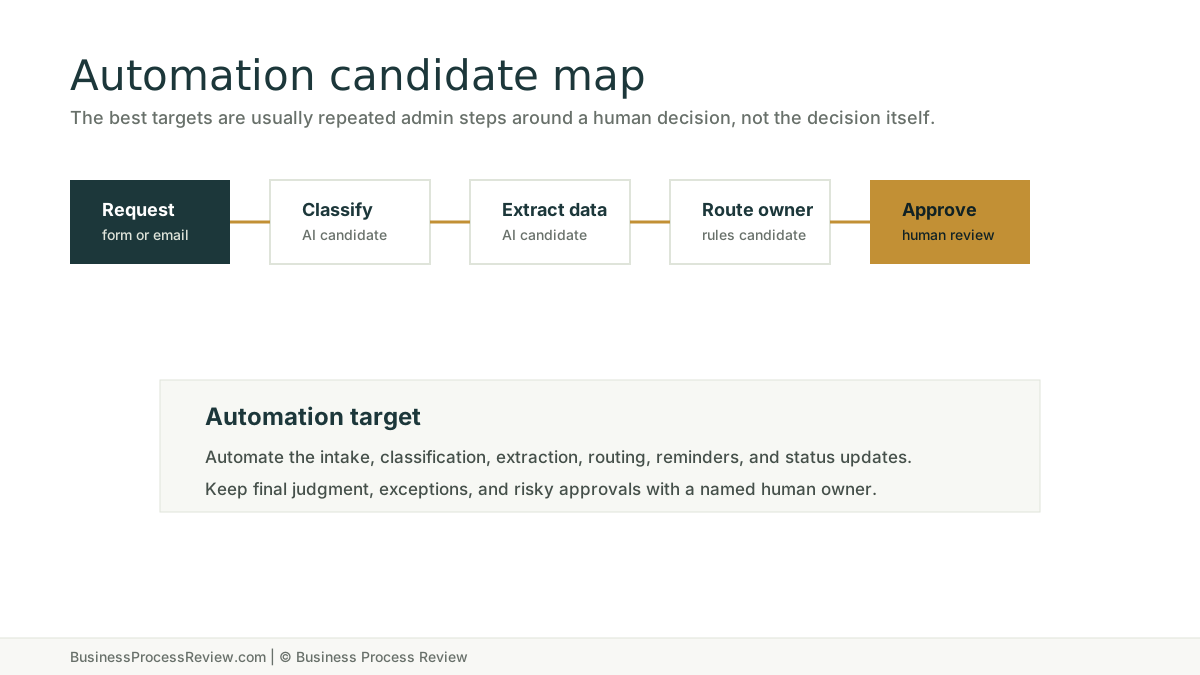
Automation works best when the decision can be expressed as a rule, confidence threshold, routing condition, classification, or draft that a human reviews.
It works poorly when the step depends on judgment that is not documented or cannot be checked.
Is there enough volume?
Do not automate a process just because it is irritating.
Low-volume work may be better handled with a checklist, template, or clearer owner. High-volume repeated work deserves a closer look because small improvements can compound.
Nintex frames process selection around choosing the right candidates for automation, not automating everything. That is the useful mindset: pick the work that repeats enough and behaves consistently enough to be worth systemizing.
The four possible answers
Automation is only one answer. A review can produce four different decisions.
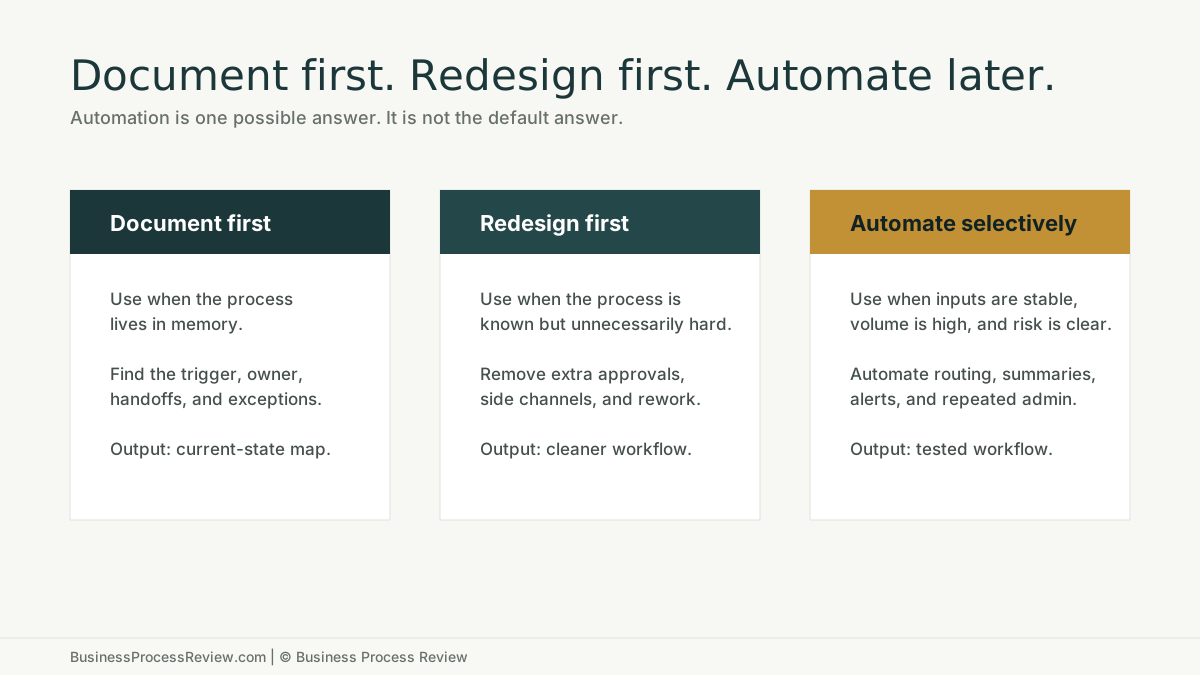
Document first
Choose this when the process depends on memory.
Signs:
- only one employee knows how it works
- steps are skipped under pressure
- new hires need constant help
- exceptions are handled differently every time
- the team argues about what the process is
Do not automate yet. Write down the real workflow first.
Redesign first
Choose this when the process is known but clumsy.
Signs:
- too many approvals
- avoidable rework
- unclear handoffs
- slow waiting time between steps
- side spreadsheets
- duplicate data entry
This is where workflow redesign creates more value than automation. Clean up the handoffs, ownership, source-of-truth rules, and review points. Then reassess.
Train first
Choose this when the workflow is technically sound but human behavior is inconsistent.
Signs:
- employees use AI differently
- managers do not review AI-assisted work
- people bypass the system
- data entry rules are ignored
- the team does not understand the new workflow
Training is not a soft extra. It is part of implementation. If the team does not adopt the workflow, the automation will sit beside the real process instead of replacing it.
Automate selectively
Choose this when the work is repeated, stable, owned, measurable, and supported by reliable data.
Good candidates include:
- document intake
- classification
- routing
- status updates
- reminders
- structured summaries
- data extraction
- report preparation
- internal knowledge lookup
Keep review gates where judgment, risk, money, legal exposure, or customer trust matters.
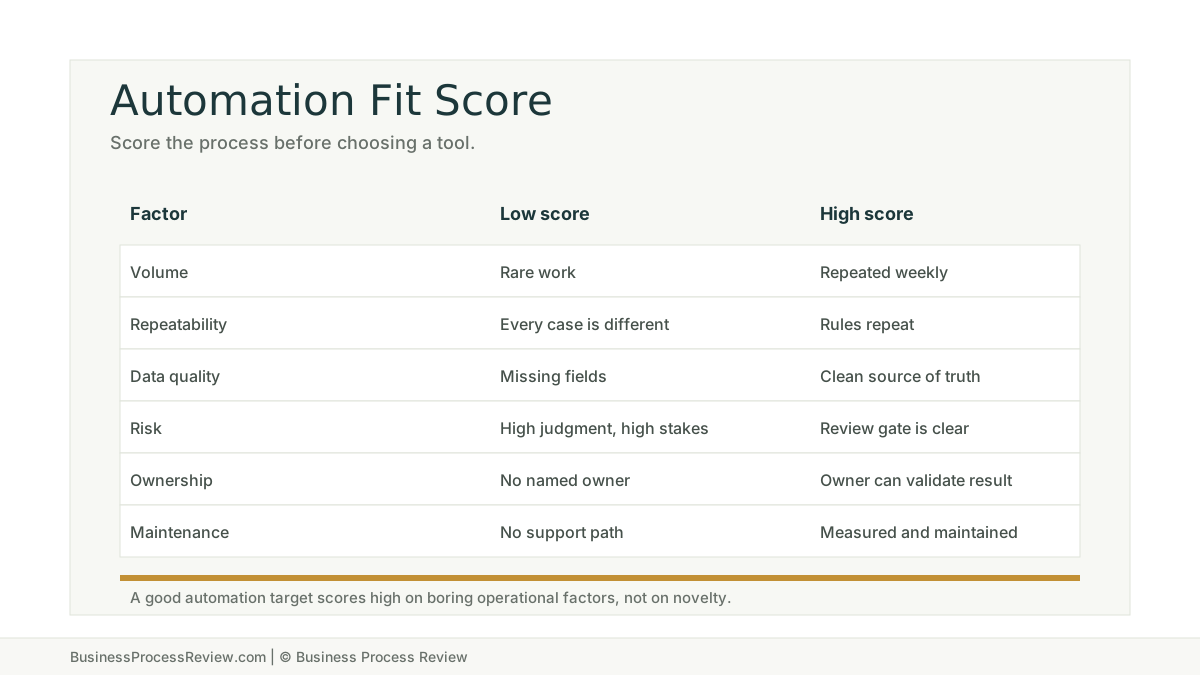
Score the process before choosing the tool
OpenText’s automation white paper emphasizes reducing manual activity and improving transparency, while also warning that automation can create rigidity if the workflow system cannot evolve. That is the tradeoff operators need to respect.
The question is not whether automation can save effort.
The question is whether the business can maintain the automation after real work hits it.
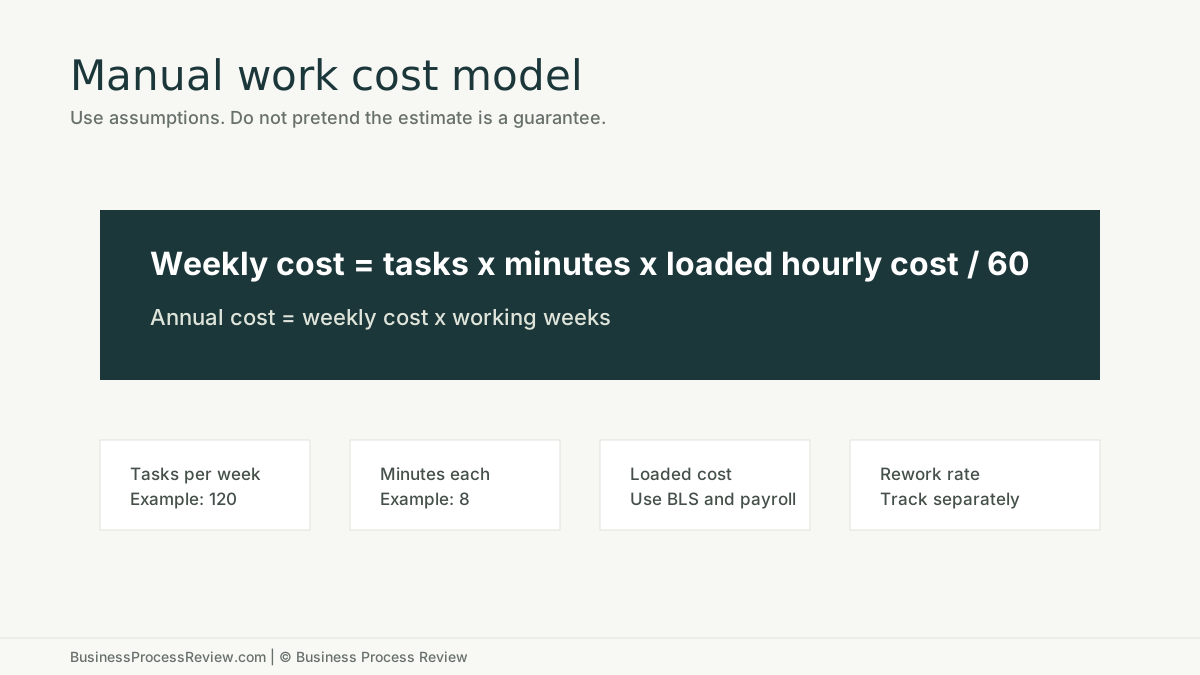
Do the math with assumptions
Labor math does not need to be perfect to be useful.
Start with a simple model:
- tasks per week
- minutes per task
- loaded hourly cost
- working weeks per year
- rework rate
- manager follow-up time
- maintenance cost
The U.S. Bureau of Labor Statistics Occupational Employment and Wage Statistics program is a useful source for wage assumptions, especially when estimating administrative work. Pair that with your actual payroll and benefits assumptions. The point is not to invent a precise ROI. The point is to see whether the problem is large enough to deserve implementation time.
Failure modes to watch
Bad automation usually fails in predictable ways.
It automates an exception-heavy process
The workflow looked repeatable in a meeting. In production, every case needed special handling.
It has no owner
No one knows who updates the rule, reviews errors, or decides when the process changes.
It uses weak data
The automation moves faster than the source data can support.
It removes the wrong human step
The team automated a decision that needed judgment instead of automating the admin work around it.
It creates a second process
Employees keep using the old spreadsheet, inbox, or chat thread because the new workflow is harder.
When to bring in implementation help
Bring in help when the business can see the opportunity but cannot turn it into a working system.
That usually means the company needs:
- current-state mapping
- automation candidate scoring
- workflow redesign
- tool and data review
- build support
- employee training
- maintenance planning
Business Process Review can review the workflow, identify automation candidates, and help build practical automation through AI automation implementation.
If you are not sure whether the process should be automated, start with the review. The review should tell you whether to document, redesign, train, or build.

About the Author
Will Gordon
Will Gordon is the founder of Business Process Review and Chief Technology Officer at Billfy. He works on workflow systems, automation, and partnerships in the ServiceNow ecosystem, with a focus on practical operational improvements for growing businesses.
Connect with Will on LinkedInFAQ
Common Questions
What is the easiest way to tell if a process should be automated?
Look for high-volume repeated work with consistent inputs, clear ownership, reliable data, and a review point. If those conditions are missing, fix the process first.
Which business processes should not be automated?
Avoid automating processes that are unclear, rarely repeated, highly judgment-based, poorly owned, or dependent on unreliable data.
Should we automate a bad process to save time?
No. Automating a bad process usually makes the bad process faster and harder to unwind. Document or redesign the workflow first.
Is AI automation different from regular workflow automation?
Yes. AI can classify, summarize, draft, and extract information. Workflow automation moves work through rules, owners, and systems. Useful implementations often combine both.
How do we estimate whether automation is worth it?
Estimate task volume, minutes per task, loaded labor cost, rework, waiting time, and support cost. The goal is a directional business case, not a guaranteed ROI claim.