Candidate judgment
Screening support may help later, but relationship judgment and fit assessment need human review and clear criteria first.
Sample deliverable
This sample shows what a focused workflow review can produce for a recruiting and staffing firm with fragmented intake, ATS and CRM duplication, manual follow-up, delayed handoffs, and inconsistent reporting.
It is not a software pitch. It is a preview of the operating clarity a leadership team needs before it redesigns a workflow, buys another tool, or automates work that is not ready.
Signs
Workflow friction usually shows up as repeated admin work before it shows up as a strategic problem. The review makes that friction visible enough to fix.
New job orders arrive without the fields recruiters need to start cleanly.
ATS and CRM records disagree, so reporting requires manual reconciliation.
Candidate follow-up depends on individual inboxes, reminders, and spreadsheets.
Client updates slow down when ownership changes after intake.
Leadership cannot see stuck work until someone asks for a status update.
Automation ideas keep appearing, but the workflow is not stable enough yet.
6
Handoffs before a candidate update reaches the right owner
3
Sources used to assemble weekly pipeline reporting
4
Places where the same client or candidate detail is re-entered
These are not benchmark claims or guaranteed outcomes.
Current state
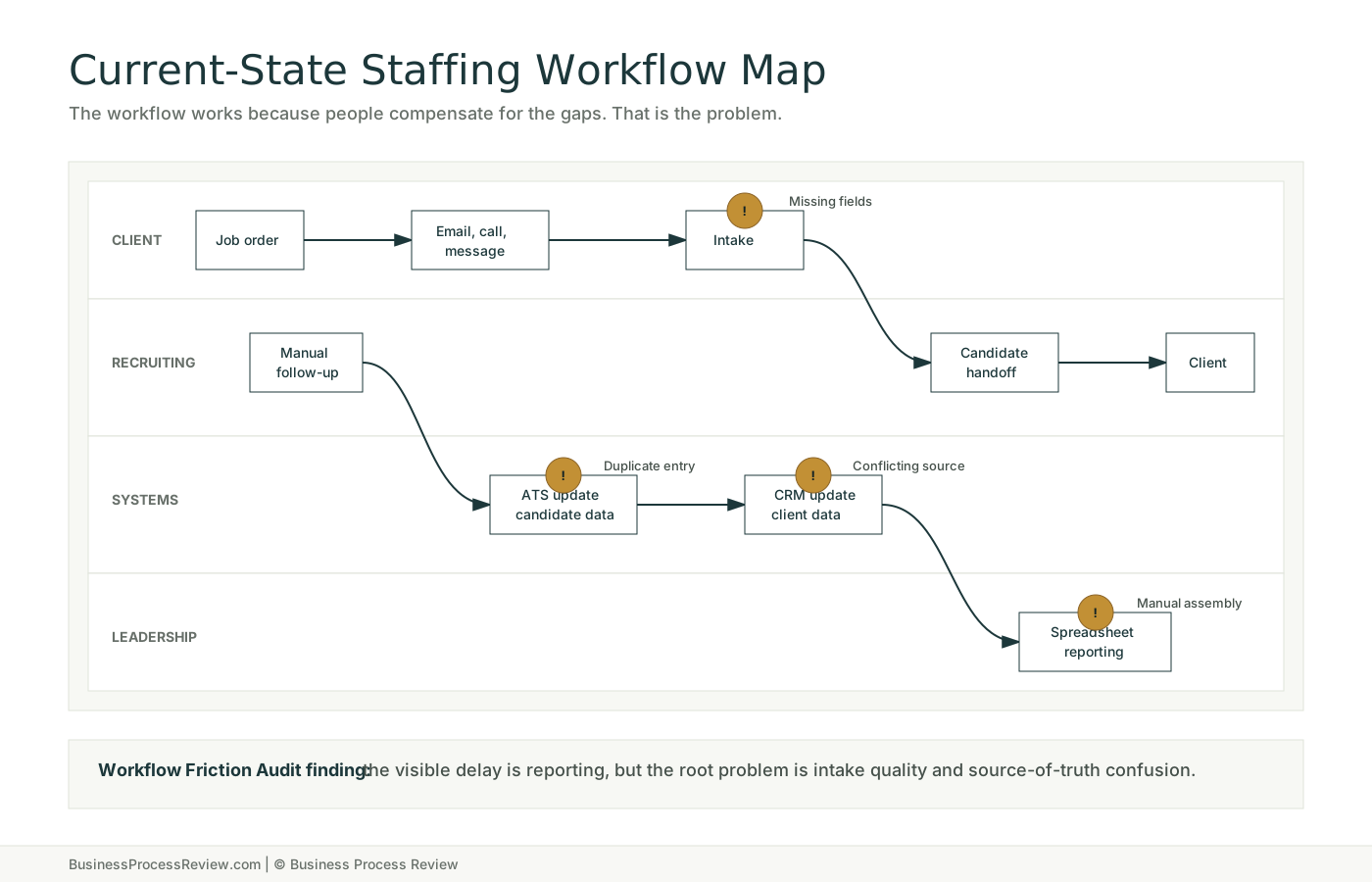
The Workflow Friction Audit starts by mapping the work as it happens, not as the company wishes it happened. Side channels, duplicate entry, missing fields, and unowned exceptions belong on the map.
Findings
The Operational Clarity Framework turns symptoms into root causes, fixes, and sequencing. That matters because some problems are ready for automation and others need cleaner operating rules first.
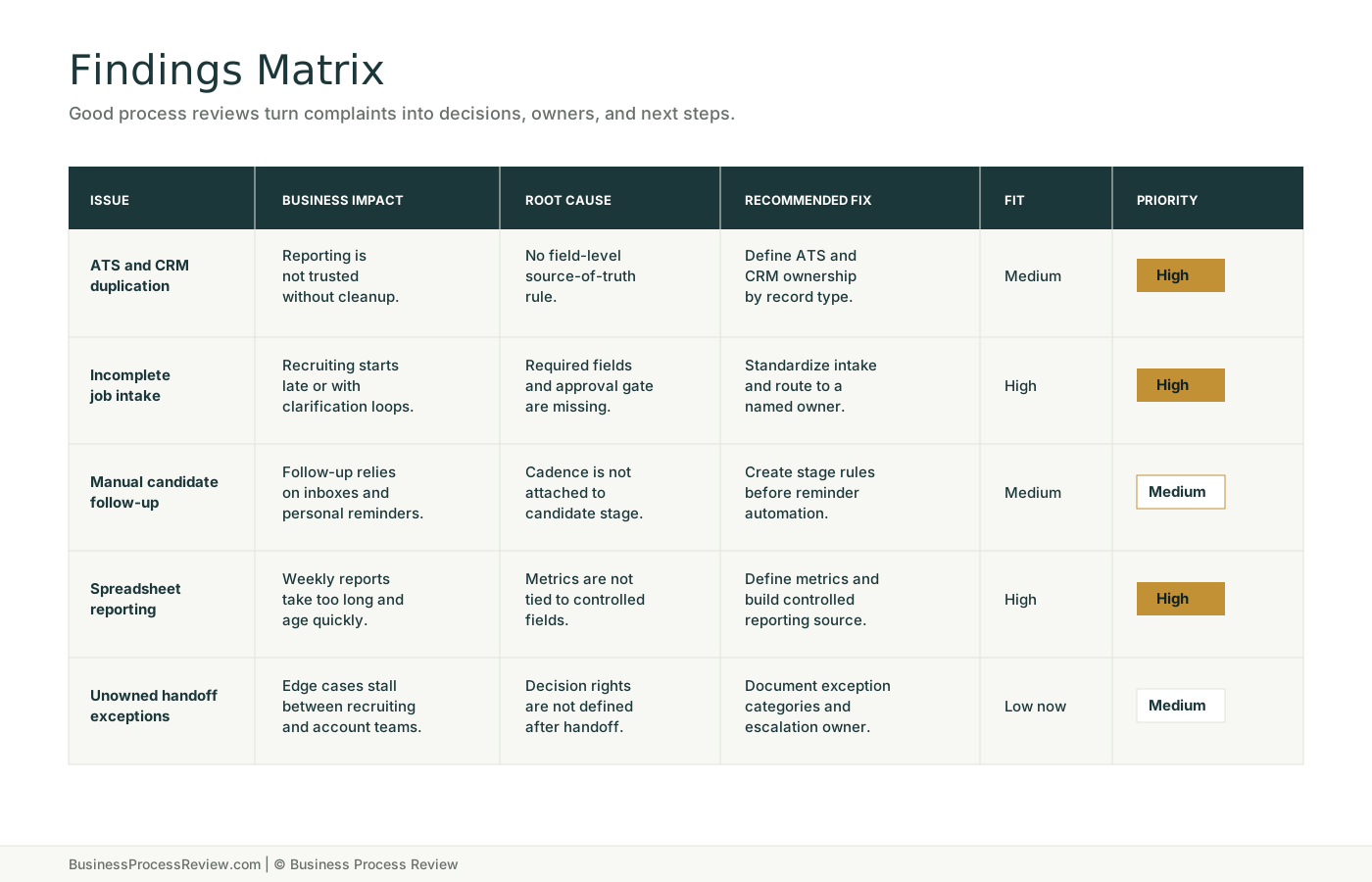
| Issue | Business impact | Root cause | Recommended fix | Automation fit | Priority |
|---|---|---|---|---|---|
| Duplicate ATS and CRM entry | Recruiters lose time reconciling records and leaders do not trust pipeline reports. | No source-of-truth rule for candidate, client, and job-order fields. | Define the ATS as candidate source of truth, CRM as client source of truth, and document sync rules. | Medium after field rules | High |
| Incomplete job intake | Recruiting work starts late or starts with avoidable clarification loops. | Intake form does not enforce required fields, owner, urgency, or approval status. | Redesign intake with required fields, intake owner, approval gate, and exception path. | High for routing | High |
| Manual candidate follow-up | Strong candidates go quiet because reminders live in personal systems. | Follow-up cadence is informal and not attached to candidate stage. | Create stage-based follow-up rules, owner reminders, and review prompts before outreach automation. | Medium | Medium |
| Spreadsheet reporting dependency | Weekly reporting takes too long and often reflects stale data. | Leadership metrics are not tied to a stable source or reporting cadence. | Define operating metrics, field ownership, reporting cadence, and dashboard source. | High after cleanup | High |
| Unowned handoff exceptions | Client and candidate issues stall when work falls between recruiting and account management. | Exception ownership is not defined for edge cases after the first handoff. | Document exception categories, escalation owner, decision rights, and response time expectations. | Low until rules exist | Medium |
Waste heatmap
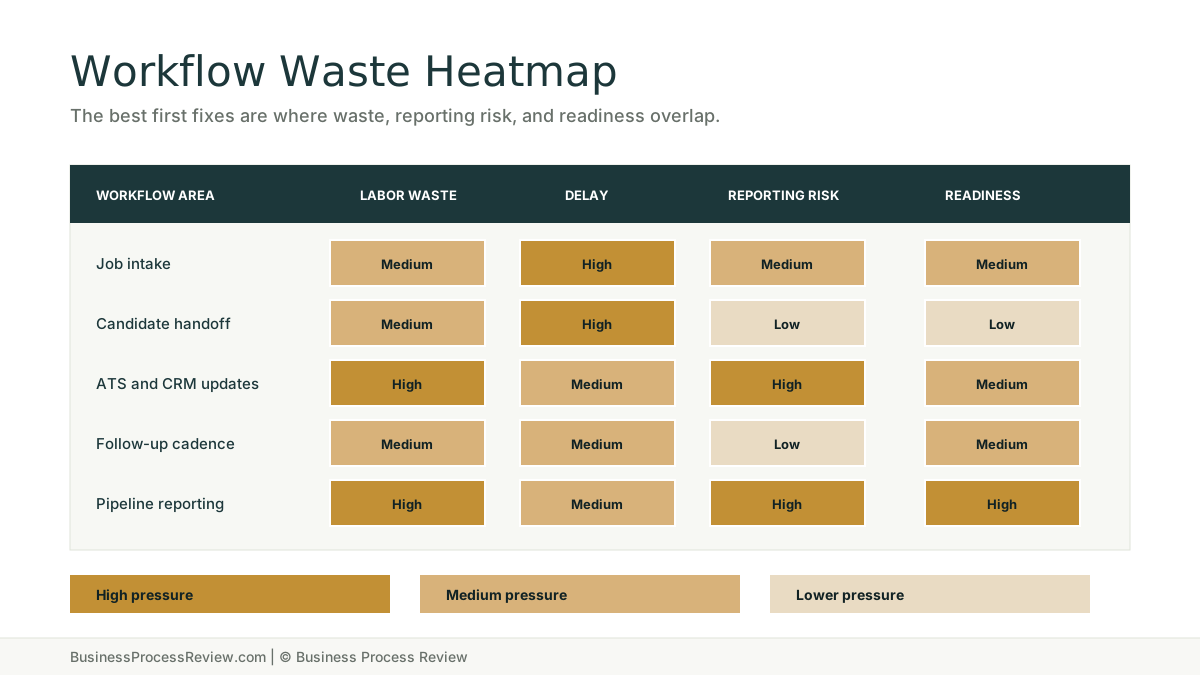
A process review should show where labor and delay concentrate. In this sample, pipeline reporting and duplicate systems work are stronger early targets than judgment-heavy candidate decisions.
Readiness
The Automation Readiness Matrix protects the business from building on top of unstable work. It does not ask whether automation is interesting. It asks whether the workflow can support it.
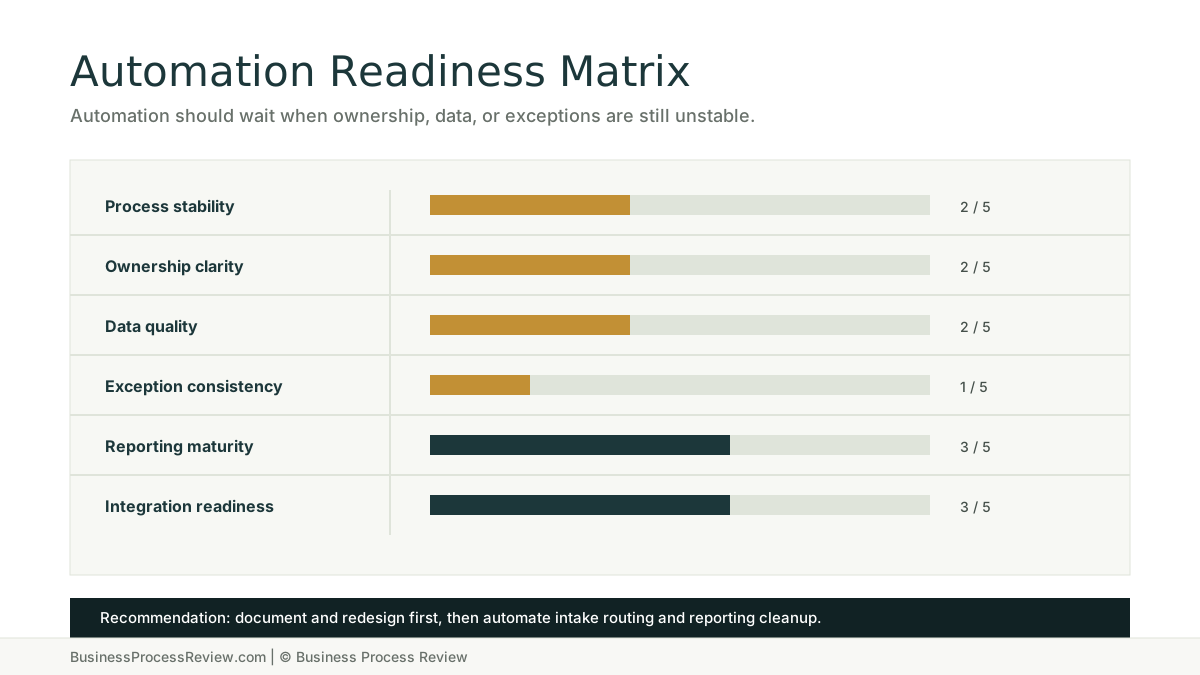
Intake and follow-up steps vary by recruiter and client.
Normal work has owners, but exceptions drift between teams.
ATS, CRM, inbox, and spreadsheet data conflict often enough to slow reporting.
Edge cases are handled through memory, messages, and relationship knowledge.
The right metrics exist, but collection is too manual.
Systems can support automation after source-of-truth and field rules are set.
Credibility check
A useful review does not turn every workflow problem into an automation project. Some work needs human judgment, cleaner data, or clearer ownership before automation belongs in the answer.
Screening support may help later, but relationship judgment and fit assessment need human review and clear criteria first.
Exceptions need categories, owners, and escalation rules before routing or AI assistance can be trusted.
Automation should not move incorrect candidate, client, or job-order data faster through the business.
Automated reminders help only after the company agrees who owns each candidate, client, and stage transition.
Before and after
| Area | Before review | After implementation path |
|---|---|---|
| Intake | Job orders arrive through email, calls, and messages with inconsistent fields. | One intake path captures owner, urgency, required skills, approval status, and exception notes. |
| Systems | ATS, CRM, spreadsheets, and inboxes each hold partial truth. | ATS owns candidate data, CRM owns client data, and reports pull from defined fields. |
| Handoffs | Recruiting and account management resolve edge cases through side messages. | Handoff rules define owner, next step, review point, and escalation path. |
| Reporting | Managers assemble weekly updates from exports and spreadsheet adjustments. | Core metrics update from controlled sources with fewer manual edits. |
Roadmap
The roadmap gives leadership a practical sequence: stabilize the work, redesign the operating rules, then automate the controlled pieces.
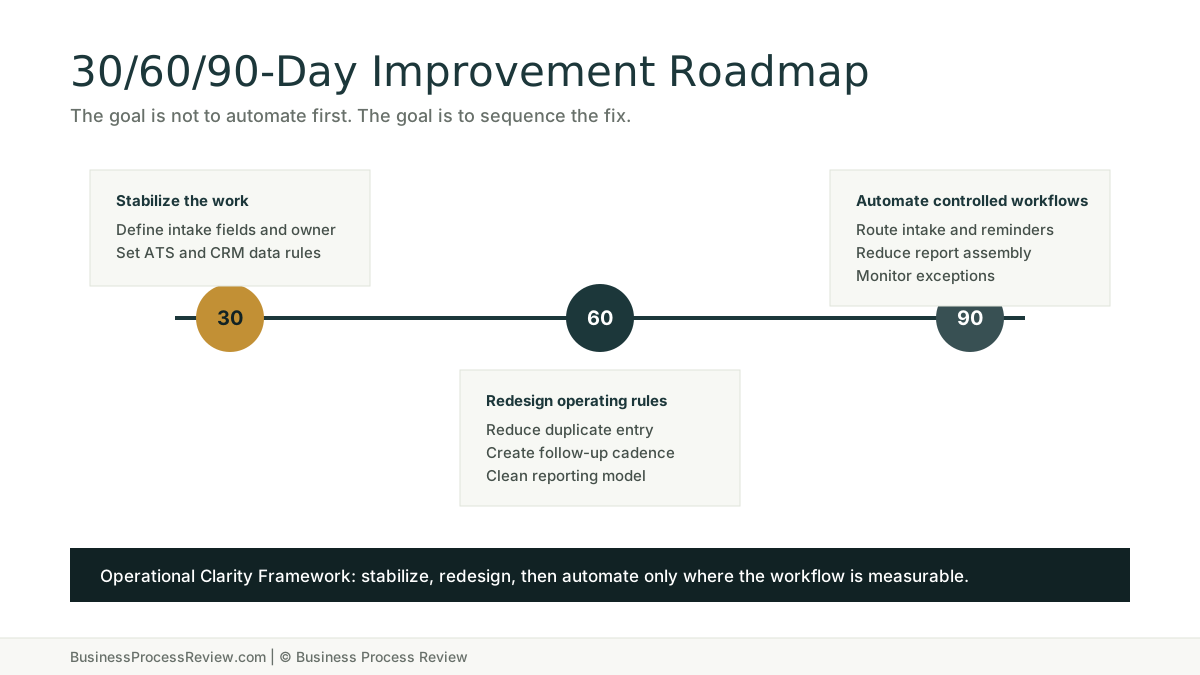
30 days
60 days
90 days
Leadership decisions
Which workflows should be redesigned before any automation is built.
Which system should become the source of truth for each operational record.
Which manual tasks are worth removing first because they affect capacity or reporting trust.
Which automation ideas are ready, which need documentation, and which should wait.
Which owner needs to be accountable for intake quality, exceptions, and reporting maturity.
Which reporting gaps are symptoms of upstream workflow and data ownership problems.
Start here when the business needs a clear diagnosis of workflow waste and operational bottlenecks.
Use when the review shows unclear ownership, weak handoffs, or operating rules that need to be rebuilt.
Use only after the workflow has stable inputs, owners, review rules, and measurable targets.
See how this operating model applies to recruiting firms, staffing firms, and talent operations.
FAQ
Yes. This is a sample scenario based on common workflow problems inside recruiting and staffing firms. It shows the type of thinking, structure, and prioritization a business process review should produce without naming or exposing any client.
Staffing firms are operationally useful examples because they rely on intake quality, candidate movement, client handoffs, ATS and CRM data, follow-up discipline, and reporting visibility. They are fast paced and high stress environments dealing with multiple parties where recruiters often document locally without a clear source of truth. Those same workflow problems show up in many service businesses.
Yes, but not every recommendation is to automate immediately. The review separates automation-ready work from workflows that first need clearer ownership, better documentation, cleaner data, or simpler operating rules.
Often, yes. Many process problems are caused by unclear rules, duplicate entry, inconsistent handoffs, and poor reporting discipline rather than a missing software product. New tools should come after the operating problem is understood.
The workflow comes first. The review looks at process stability, ownership, data quality, exceptions, reporting maturity, and integration readiness before recommending AI or automation. Poor workflows do not become good workflows because AI is added.
Use it to compare your own workflows against the sample findings. If the same patterns show up in your company, the next step is not another tool demo. The next step is a focused review of how work actually moves.
Start with a Business Process Review. We will look at how the work actually gets done, find the friction, and show what can be fixed with better process and practical AI automation.